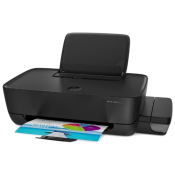
KYOCERA ECOSYS P8060cdn
Short review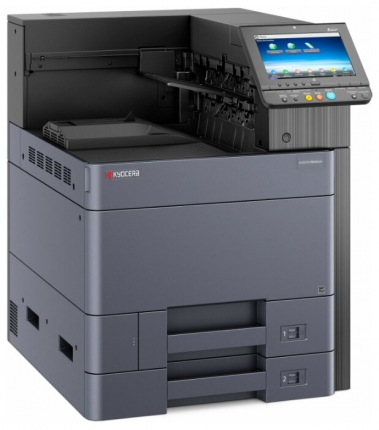
Selected in the rating
6
Best rating
photo printers
A3 - For photo studio - Duplex - Laser
Buy KYOCERA ECOSYS P8060cdn
Specifications KYOCERA ECOSYS P8060cdn
Yandex.Market data
| General characteristics | |
| Device | a printer |
| Color printing | colored |
| Printing technology | laser |
| Accommodation | desktop |
| a printer | |
| Maximum format | A3 |
| Automatic duplex printing | there is |
| Number of colors | 4 |
| Maximum resolution for b / w printing | 1200x1200 dpi |
| Maximum resolution for color printing | 1200x1200 dpi |
| Print speed | 60 ppm (b / w A4), 55 ppm (color A4), 30 ppm (b / w A3), 27 ppm (color A3) |
| Warm-up time | 17 sec |
| First print out time | 3.80 s (b / w), 5.10 s (color) |
| Trays | |
| Paper feed | 1150 sheet. (standard), 7150 sheet. (maximum) |
| Paper output | 500 sheet. (standard), 4300 sheet. (maximum) |
| Bypass tray capacity | 150 sheet. |
| Consumables | |
| Paper density | 52-300 g / m2 |
| Printing on: | cards, transparencies, labels, glossy paper, envelopes, matte paper |
| Resource color cartridge / toner | 20,000 pages |
| Resource b / w cartridge / toner | 30,000 pages |
| Number of cartridges | 4 |
| Cartridge / Toner Type | black TK-8800K, yellow TK-8800Y, magenta TK-8800M, cyan TK-8800C |
| Memory / Processor | |
| Memory size | 4096 MB |
| Hard drive capacity | 320 GB |
| CPU | Freescale QorIQ T1024 (Dual Core) |
| CPU frequency | 1200 MHz |
| Interfaces | |
| Interfaces | Ethernet (RJ-45), USB |
| USB version | 2.0 |
| AirPrint support | there is |
| Memory card reader | there is |
| Memory card support | SD |
| Expansion slots | 1 |
| Direct print | there is |
| Web interface | there is |
| Fonts and control languages | |
| PostScript support | there is |
| Support | PostScript 3, PCL 5c, PCL 6, PDF |
| Number of PostScript Fonts Installed | 136 |
| Number of PCL Fonts Installed | 93 |
| Additional Information | |
| OS support | Windows, Linux, Mac OS, iOS |
| Information display | color LCD |
| Display diagonal | 9 in. |
| Power consumption (during operation) | 960 Wt |
| Power Consumption (Standby) | 60 watts |
| Noise during operation | 55.5 dBA |
| Standby noise | 19 dBA |
| Dimensions (WxHxD) | 602x790x665 mm |
| Weight | 89 kg |
| Features: | 8 GB solid state drive (SSD) |
Comments To KYOCERA ECOSYS P8060cdn
Yandex.Market data
Advantages:
The printer fully satisfies our needs to print large quantities of projects in a short amount of time. Of the latter: it was necessary to print 19,000 pages of text, where A4 and A3 formats and mixed-weight paper are found. I did it with a bang. I typed for 8 hours almost non-stop. He picked up heavy cover paper from the side tray, A3 from the lower tray, and A4 from the top. Moreover, the printer did an excellent job with double-sided printing, the formats did not mix. After using the Sharp AR-M205 printer our Fedor, as we jokingly call him, is just a song. The only thing that the printer driver for Windows could not digest was vector maps with several hundred thousand segments each. But the built-in printer driver helped out - it prints directly from flash memory via the USB connector of the printer.
Disadvantages:
Original cartridges cost from 21,000 to 24,000 rubles. I contacted the Chinese cartridge manufacturer Kilinder. After negotiations, we bought 3 cartridges for $ 184.9 with delivery from China directly to our hands. A month after payment, the cartridges arrived; we disconnected the chips from them, and they worked like family. In this case, the printer signals when the toner runs out, even without a chip. Now we have ordered from the same manufacturer only toner (powder) in cans. But that's a completely different story. It sometimes fails to route a print job from the computer directly to the printer — double-sided documents are printed upside down. But such failures do not happen when you send a job first to the printer's hard disk, and from there you print to paper from the printer screen.
Comment:
In the photo, the printer swears at the third-party cartridge, but accepts it. It seems that the same plant churns out cartridges under license during the day, and churns out cartridges without a license under cover of night. Almost a year later, the printer gave an error - C2840 and refused to work. I read the service manual, extracted the primary print unit, and put it back - the printer is working.
April 5, 2020, Moscow